
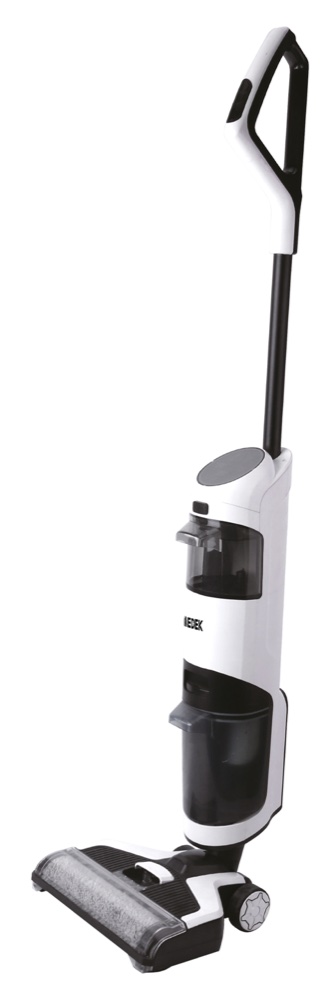
Corded Vacuum Mop Black
User manual — Corded Vacuum Mop Black (reference MD7702W, barcode 3700902209804), available for download in French and English. You'll also find its technical specifications, a video and 12 frequently asked questions here.
- Model
- MDEP0226NRSKU MD7702W
- Barcode (EAN)
- 3700902209804
User manual
- Manual for MDEP0226NRFrançaisPDF · 17 pp. · 2.3 MoDownload →
- Manual for MDEP0226NREnglishPDF · 17 pp. · 0.8 MoDownload →
Specifications
Power supply
- Power
- 180 W
- Battery
- 2.6 Ah
Capacity & size
- Tank capacity
- 500 ml
- Dimensions
- 280 × 335 × 1,210 mm
Operation
- Speeds
- 2
- Noise level
- 82 dB
Tutorials & troubleshooting
Frequently Asked Questions
The brush doesn't turn when the appliance is upright, is this normal?+
Yes. In the upright position, the floor brush automatically stops turning and the appliance does not clean. Tilt the machine forward for it to resume operating. If the appliance is stood upright for less than 30 seconds, it starts again normally as soon as it is tilted back down.
A red indicator light comes on the screen, what does it mean?+
A red indicator light means the machine cannot operate normally and that action is needed immediately. The indicators signal, among other things, a full dirty water tank, a jammed brush or a lack of clean water. Fix the problem before continuing, or the appliance may be damaged.
Suction has dropped and the appliance is heating up, what should I do?+
Clean the dirty water tank after every use: if it stays full, the ventilation path becomes blocked, suction drops and the motor overheats. Also regularly check that the suction nozzles are in good condition. If overheating, unusual noise, an unusual smell or a leak occurs, stop the appliance immediately and call a technician.
Water leaks out when the appliance is being stored, why?+
Always store the appliance upright. Laid flat or upside down, the water in the dirty water tank flows back and causes leaks. Empty and rinse this tank after every use.
My vacuum mop smells bad, how do I fix this?+
The roller brush and the dirty water tank must be removed and cleaned promptly after every use, otherwise they give off a bad smell. Empty the dirty water tank, rinse it with clean water and leave it to dry before refitting it.
What water and what product can I put in the tank?+
Pour clean water below 60°C into the clean water tank, up to the required level. A neutral floor cleaner can be added in the stated proportion. Close the top cover tightly, then refit the tank by engaging its lower part in the groove first, until it clicks into place.
What floors can I use this vacuum mop on?+
The appliance is suitable for indoor hard floors: tile, porcelain, marble, granite, stone, terrazzo, solid hardwood, composite flooring, bamboo, rubber and waxed floors. On an uneven surface, results may be poorer. Never vacuum sharp objects, ash, very fine dust such as plaster or cement, or chemical or flammable products.
How do I start the self-cleaning cycle?+
Place the appliance on its charging dock. While charging, press the dry mode / self-cleaning button to turn self-cleaning on or off: the corresponding icon lights up on the screen. Once the cycle is finished, the appliance switches off automatically.
How do I charge my wet and dry vacuum cleaner?+
Charging is done on the charging base supplied with the appliance. Place the vacuum cleaner on the base, plug one end of the charger into the base and the other into a wall socket, keeping the appliance upright near a wall. Use only the adapter supplied and, if you are not using the appliance, charge it at least once a month.
How do I know whether the battery is charged?+
Look at the appliance's LED display: it has a battery level indicator, next to the indicators for speed, full dirty-water tank, jammed brush and lack of clean water. If the level is low, put the vacuum cleaner back on its charging base before carrying on.
The appliance shows error code E5 and stops, what should I do?+
Error code E5 indicates an internal fault: the appliance runs for a few seconds, gives three short beeps and then stops, often with the clean-water tank indicator lit. This fault cannot be put right at home. Stop using the appliance and contact the shop where you bought it: they will arrange the return for repair.
The appliance shows error code E4 and will not restart, what should I do?+
Start by removing the brush, cleaning it and refitting it correctly. If code E4 is still showing after this check, the appliance must go back for repair. Stop using it and contact the shop where you bought it: they will arrange the return.